DAS & NAS Storage Solution: Admin Flows
Product Design · Enterprise Storage · B2B
PROMISE Technology — WebPAM 5.0
Redesigning admin workflows, from three legacy GUIs to a modular design system and guided failure recovery.
Role
R&D UI/UX Engineer
Duration
Oct 2025 – present · both lines shipped
Products
Pegasus DAS · VTrak NAS
Stack
Vue 3 · TypeScript · ECharts · Redfish and REST APIs
Team
Product Manager · Frontend Engineer · Backend Engineer · Firmware Engineer
WebPAM 5.0 on a Pegasus5 R12 with one drive offline.
Each large card has two views, switched with the arrows in its header: the summary first, then the detail. The health card was designed for one abnormal drive and for many.

Left: the capacity card’s two views. Right: the health card with one abnormal drive, and with many under a fixed heading. From the DAS design file.
One web interface for two different storage systems.
The DAS and NAS specs had to solve three problems.
01
Some actions can’t be undone. A small mistake can delete data or misconfigure an array.
02
What’s safe depends on the hardware’s state, so admins need to see that state first.
03
Two product lines share one web interface. Shared parts must behave the same on both, while storage and connection pages follow each product’s hardware.

Pegasus DAS
Direct-attached storage for one Mac or PC.
Storage
Drives
↓
Disk array
↓
Logical drive
Connection
Thunderbolt or USB
Shared WebPAM
The same in both interfaces.
Navigation structure
Component library
Action availability
Input validation
Typed confirmation
Loading and result states

VTrak NAS
Network storage serving many hosts.
Storage
Drives
↓
Pool
↓
Volume
Connection
iSCSI, Fibre Channel or RDMA
Controllers
Can have two controllers
Two products with different storage models and connections, and the parts of WebPAM 5.0 they share. Product drawings from the WebPAM design files.
Three customer segments run these systems.
Studio IT
Media & Entertainment
Deliver on tight deadlines, so a lost or locked file stops the work.
Site reliability
Internet Services
Keep a public service running around the clock, where one slow drive slows every request.
Research IT
Research & HPC
Keep data from long experiments that cannot be run again.
All three need to read the system’s state quickly and must not lose data by mistake. The action rules below are written for those two needs.
Action Rules
Four rules decide what an admin can do, and when, on both product lines.
I wrote them as notes beside each flow in Figma, so engineers read each rule next to the screen it applies to. Below, they follow the order of an action.
- 01 · Before the actionAction availabilityHide an action that doesn’t apply. Disable one that’s blocked.
Design fileA row in Transport Ready keeps its actions, disabled. Pegasus · DASDisk Array: Add Spare Drive is greyed out in the array’s menu. VTrak · NASiSCSI Target Settings: each CHAP mode shows only its own fields. - 02 · Before the actionInput validationOffer only the choices that will work. Check typed values at the field.
Design systemText field: default, focus, and an error under the field. Pegasus · DASCreate Disk Array: an empty Array Name is marked This field is required; typing a name clears it. VTrak · NASMap LUN: Add with no LUN picked marks the field, This field is required. - 03 · At an irreversible actionTyped confirmationIf the data can’t come back, the admin types confirm.
Design systemDialog: one click when it can be undone; type confirm when it can’t. Pegasus · DASDelete Disk Array: Confirm stays disabled until confirm is typed. VTrak · NASRemove RDMA: the volume stays, so one click confirms it. - 04 · During and afterLoading and result statesEvery action follows the same loading, success and error handling.
Design systemSnackbar: loading, success, error. Pegasus · DASSetup wizard: being created, then Successfully Created and the toast. VTrak · NASAdd FC LUN fails: the toast gives the reason and the error code.

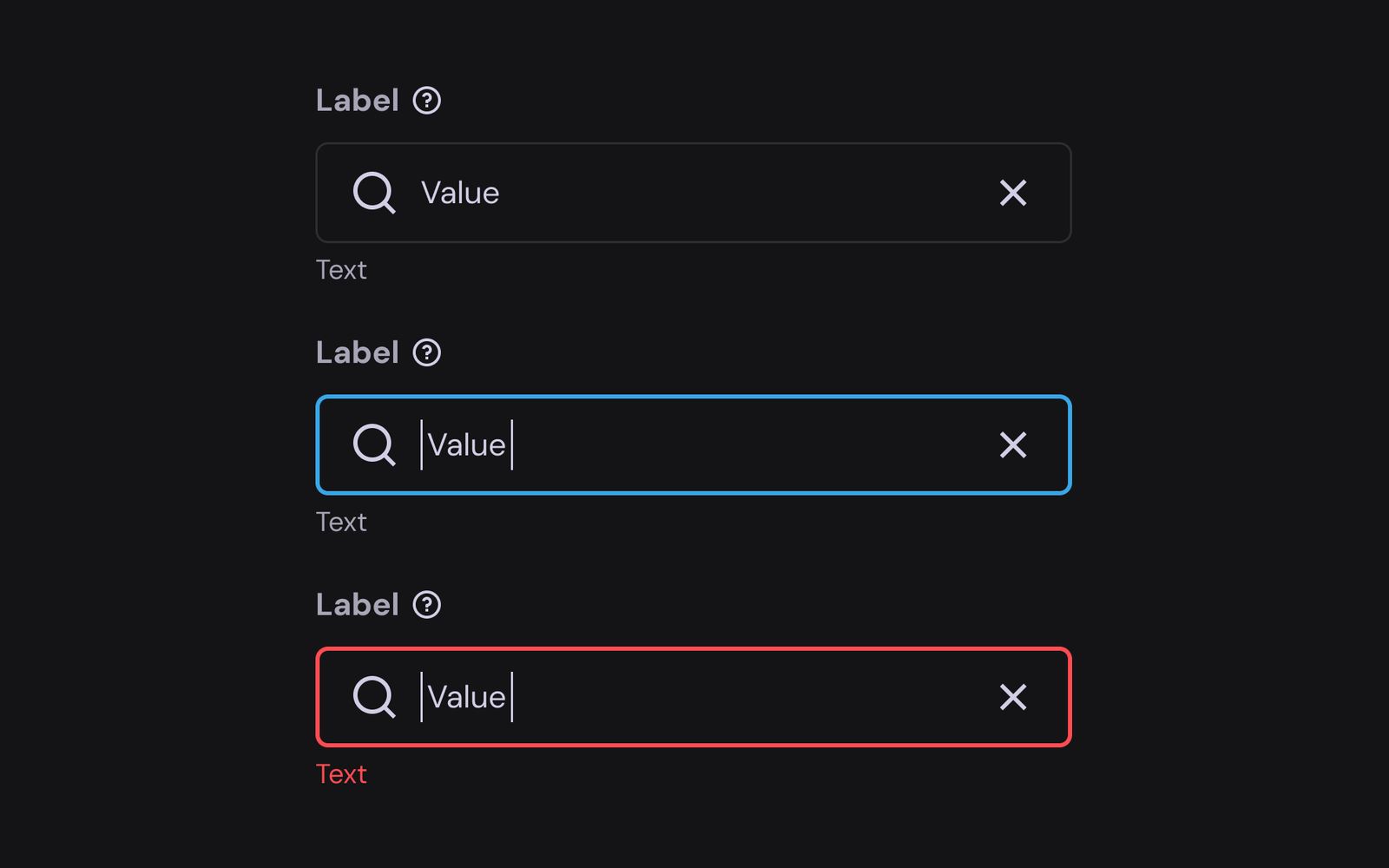


The component from the PROMISE design system (01 from the WebPAM design file); the products as recorded in WebPAM 5.0, each clip cropped to where the rule happens. Label, Value and Content are the system’s own placeholders.
Failure Recovery
Recovery depends on what the drive reports.
An offline, degraded or predictive-failure drive doesn’t lead to the same next step. WebPAM first shows the condition, then guides the admin toward the steps for that status.
Pegasus DAS, one drive pulled, recorded in WebPAM 5.0. Waits play at 4×.
The recording shows one failure. On the Abnormal Drive page each drive status gets its own hint, so the guidance and the available actions depend on the reported state.
From the Abnormal Drive hints in the DAS spec, one hint per drive status. The NAS spec uses the same steps. Tap a path to bring it forward.
Product Differences
What depends on the hardware is designed per product; everything else follows the same rules.
Both products use the WebPAM 5.0 component library and the same action rules. VTrak NAS has its own storage model, connection setup and controllers, so those pages were designed for it. The menus and recordings below are from the shipped interfaces.
Navigation
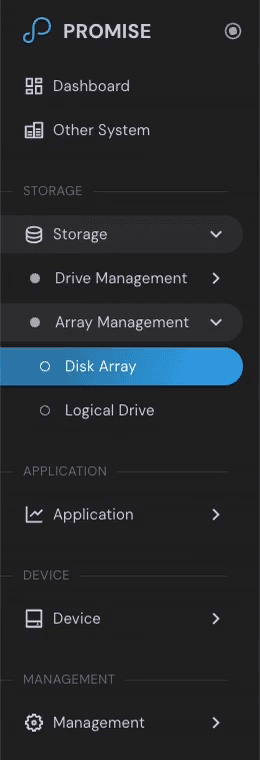

Same task
Pegasus calls it a disk array and a logical drive, VTrak a pool and a volume; the three steps are the same.
Pegasus DAS and VTrak NAS, recorded in WebPAM 5.0. Waits play at 4×.
Shared and changed
Stayed shared
Everything under Shared WebPAM in The Problem
Recovery steps
Event severity levels
Changed with the hardware
Disk arrays and logical drives became pools and volumes
A Connection menu, only on NAS
One mapping page per protocol
Second-controller fields, shown only when the API reports one
Settings that turn read-only when IPv4 is off
NAS-only: Connection
The Connection menu holds iSCSI, Fibre Channel, RDMA and network settings. iSCSI and Fibre Channel share one LUN mapping API, but a teammate and I gave each protocol its own mapping page: iSCSI hosts are identified by IQN, Fibre Channel hosts by WWPN, and an admin sets up one network at a time.
Recorded in the shipped VTrak NAS interface: Connection opens to RDMA, iSCSI, Fibre Channel and Network, and iSCSI and Fibre Channel each have their own pages.
More of WebPAM
A few more views across storage, monitoring and device management, from the DAS design file.


Handoff
Each flow included the details engineering needed to build it.
In the Figma spec, each flow had these four kinds of notes beside its screens, under a status header. I also built part of the front end in Vue and TypeScript.
Action rules
Field behavior
API mapping
Implementation notes
Status header
Draft
→
Ready to dev
Handoff — Flow spec
Abnormal Drive in the DAS spec, status Ready to dev: a hint for each drive status, the Reuse confirmation, and notes for engineers.
153 flows reached Ready to dev across the two specs: 83 for DAS and 70 for NAS. Ready to dev is the handoff status in the spec, not a release.
Choose a note to see where it sits in the spec.
Open the full spec image
Handoff — API to UI
A drive comes back from the backend with more fields than an admin needs. The IA lists the fields the UI shows and the label for each; where the API returns nothing, the UI shows N/A.


Top: one physical drive as the NAS CLI reports it, 26 fields, with the model and serial number masked. Bottom: the fields the IA maps to labels in the UI.
Handoff — IA
The NAS IA lists every page with its menu level and the phase it ships in. DAS pages that NAS does not use, such as Disk Array and Logical Drive, stay in the list in purple, marked N/A; their NAS counterparts, Pool and Volume, sit under Pool Management.

The Home, Storage and Connection rows of the NAS IA (WebPAM 502), from the original spreadsheet. Click it to enlarge.
Handoff — Spec to shipped
Spec · Dashboard tooltip
Displayed IOPS are affected by the array’s chunk size. When the chunk size is smaller than your application’s IO size, the displayed IOPS will be higher.
Shipped

The wording shipped almost unchanged; IOPS was renamed to IO Rate.
Result & Impact
Both product lines shipped on the same design system and rules.
Each number maps to one of the three problems above.
Pegasus DAS
Q2 2026
VTrak NAS
Shipped
01 · Can’t be undone
15
IRREVERSIBLE FLOWS USE TYPED CONFIRMATION
9 DAS, 6 NAS
02 · State first
748
ANNOTATIONS ACROSS 350 DAS SCREENS
Each state, limit and message written beside the screen it applies to
03 · One design system
153
FLOWS REACHED READY TO DEV
83 DAS, 70 NAS
What I Learned
What I’d take into the next interface.
01
Write each rule beside its screen. Engineers read the rule where they build the screen, and a rule written once covers both specs wherever the behaviour is the same.
02
Start from what the API returns. The loading overlay waits for the API to return, and a field the API leaves empty shows N/A.
03
Decide early what is shared and what follows the hardware. Once the action rules were settled, the NAS work could go into what its hardware needs: storage, Connection and the controllers.
© 2026 Sam Wang